
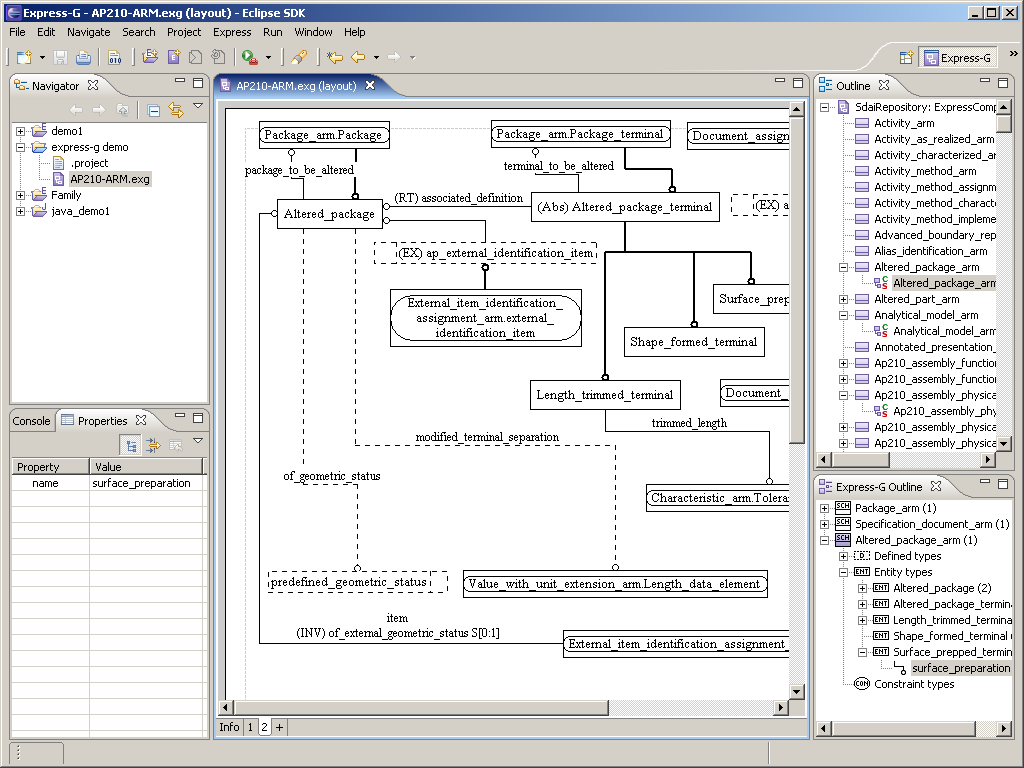
 Click to enlarge
The JSDAI Express-G Editor is a tool to create graphical EXPRESS diagrams according to the specification of EXPRESS-G given in ISO 10303-11.
Currently Express-G Editor works in layout mode. In this mode one or several EXPRESS schemas are given and compiled with the JSDAI Express Compiler in advance. The result of the compilation can then be used to layout EXPRESS diagrams according to the given EXPRESS schemas. For the future we plan on extending this tool for the create mode - then it will be possible to create or modify EXPRESS schemas graphically.
.exg files
JSDAI Express-G Editor operates on files with an extension .exg. These files contain EXPRESS schema(s) and graphical layout details. The .exg files are similar to .exd files, which are generated by the JSDAI Express Compiler. An .exd file is needed to create a new .exg file or to update an existing one.
Schema display
EXPRESS defines two kinds of diagrams, schema level diagrams and entity level diagrams:
- Schema
level diagrams support the fact that one EXPRESS schema can interface
other schemas. We distinguish further between single and multiple schema level diagrams.
- A single level schema diagram represent only one top schema and the directly interfaced schemas. Indirectly interfaced schemas are not visible.
- A multi level schema diagram is able to show the complete dependencies of many interacting schemas.
- In the Entity level diagrams all the data types such as entities, defined types with all their relations and attributes, are displayed.
In layout mode a schema may be represented only partially or completely. For reference purpose a complete graphical layout with all details is typically required. For explanatory purposes however it is desired to draw only some main objects and relations, but skip less important details.
JSDAI Express-G Editor supports all features of EXPRESS-G given in the first and second edition of ISO 10303-11.